Australia Post (often called AusPost) is the primary postal service down under, handling millions of domestic and international parcels every week. While their network is vast, navigating tracking updates—especially when a parcel is delayed or traveling long distances across the Outback—can sometimes be confusing.
This guide explains how to track your Australia Post shipment, what the tracking number looks like, exactly what each tracking status means, and what steps to take if your delivery runs into a problem.
How to Track an Australia Post Shipment
To check the progress of your delivery, you will need your unique Australia Post tracking number (sometimes called a Parcel Number).
Tracking Methods:
Online Tool: Visit the Australia Post Tracking page and enter your tracking number. You can track up to 10 items at once by separating the numbers with spaces or commas.
AusPost Mobile App: The Australia Post app (available for iOS and Android) is the most convenient method. By creating a MyPost account, the app automatically tracks parcels linked to your email address and sends push notifications for delivery updates.
The Australia Post Tracking Number Format
If you are unsure if you have the right number, check its format. The most common Australia Post tracking number for domestic and standard international shipments is a 13-character alphanumeric code.
Typically, it follows this structure:
- Starts with 2 letters: (e.g., EE, RR, CP)
- Followed by 9 digits: (e.g., 123 456 789)
- Ends with "AU": Indicating Australia.
Example Format: EE 123 456 789 AU
Note: Some domestic parcel post or Express Post tracking numbers might simply be a string of 12 to 14 digits without letters, often starting with "33" or "61".
Using the AusPost Mobile App for Tracking. Source: Australia Post
Understanding Australia Post Tracking Statuses
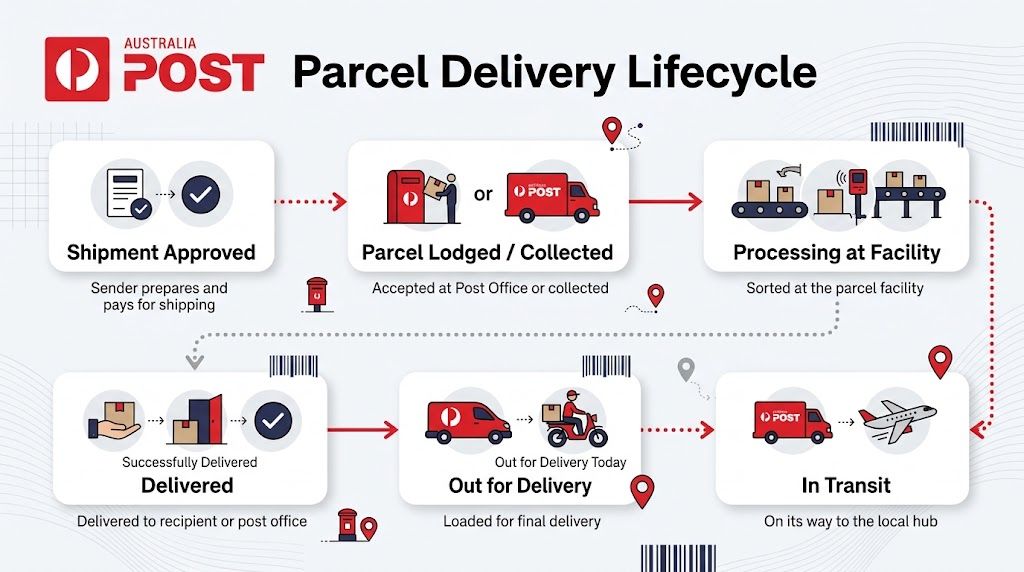
Australia Post tracking updates represent physical scans at sorting facilities and by posties (delivery drivers). Here is a breakdown of the normal delivery sequence and what each status actually means:
- Shipment information approved / Ready for processing: The sender has created a shipping label and Australia Post has the electronic details, but the physical parcel has not yet been handed over or scanned into the AusPost network. If it stays stuck here, contact the sender.
- Received / In possession of item: Australia Post has physically scanned the parcel. It is officially in their network.
- In transit / Processed at facility: The parcel is moving between sorting centers or traveling to its destination state. Don't panic if it stays "In transit" for a few days—Australia is massive, and long domestic transport routes take time.
- Onboard for delivery: The parcel has been scanned by the postie and loaded onto the delivery van. It should arrive today.
- Delivered: The item has been dropped off. The tracking will often specify if it was left in a safe place or signed for.
Statuses Requiring Your Action
Sometimes, a delivery doesn't go as planned. Watch out for these statuses:
- Attempted delivery / Carded (We called but you weren't home): The postie tried to deliver the parcel, but no one was home to sign for it, or there was no safe place to leave it. They will leave a physical card in your mailbox.
- Awaiting collection: Following a failed delivery attempt, the parcel has been taken to a local Post Office. You must go to the nominated Post Office with photo ID (and the card left in your letterbox) to collect it before the holding window expires.
- Possible delay: This means there is a known interruption affecting the service, such as extreme weather events, natural disasters, or transport network disruptions. The parcel will still arrive, but it will take longer than initially estimated.

How to Handle Delivery Issues and Delays
If your parcel is taking longer than expected, follow these steps:
Check for Service Disruptions: Before worrying, check the Australia Post Domestic Service Updates page. "Possible delays" are often caused by known network issues in specific regions.
Wait for the Grace Period: Australia Post officially requests that you wait until 10 business days after the expected delivery date before submitting a missing item enquiry for standard domestic parcels.
Exception for Essential Items: If your parcel contains urgent medical supplies, passports, or sentimental items that cannot be replaced, do not wait the 10 days. Contact Australia Post immediately.
Contact the Sender: If the status has been stuck on "Shipment information approved" for over a week, the sender likely never dropped the package off. You must contact the store or sender directly to resolve this.
Filing an Enquiry
If the 10-day grace period has passed, or your parcel is marked "Delivered" but is nowhere to be found, you can raise an investigation by logging into your MyPost account online or using the app and submitting a "Late or missing item" enquiry form.
Frequently Asked Questions (FAQs)
How long does Australia Post hold a parcel for collection? Typically, Australia Post will hold a parcel at a local Post Office for 10 business days. If it is not collected within that timeframe, the status will change to "Return to sender," and the parcel will be shipped back to the origin address.
What does it mean if my tracking hasn't updated in days? If it says "In transit," it is likely traveling across the country. Long-haul transport between major cities or to regional areas can take several days without a scan.
Can I redirect an Australia Post parcel? Yes, if you have a MyPost account, you can often redirect eligible parcels to a new address, a 24/7 Parcel Locker, or a local Post Office while the item is still "In transit."